
By the Bizzfield Sales Ops Team — reviewed July 2026
If you've started evaluating Sales Force Automation (SFA) software for your field team, you've probably noticed something frustrating: almost no vendor publishes a straight number. You'll see "starting from," "contact sales," or nothing at all. That's not always a sales tactic — SFA pricing genuinely depends on variables that differ from one business to the next: how many field reps you have, which modules you need, whether you're integrating with an existing ERP, and how much support your team requires.
This guide breaks down what actually drives SFA software cost in India, what typical pricing ranges look like across different business sizes, where hidden costs tend to appear, and how to compare vendors on more than just the headline number. Nothing here is a substitute for a scoped quote — but it should make you a much sharper buyer before you ask for one.
📌 Quick Answer
Most cloud-based SFA platforms in India price between ₹500 and ₹3,000 per user, per month, depending on features and scale. Implementation is usually billed separately as a one-time fee. Enterprise deployments with heavy customization typically move to custom, quote-based pricing.
- SFA software in India typically costs ₹500–₹3,000+ per user, per month — the exact rate depends on business size and feature depth.
- Pricing bundles three separate costs: software licensing, implementation & onboarding, and support & maintenance.
- Enterprise and highly customized deployments almost always move to custom, quote-based pricing.
- Hidden costs — data migration, post-launch customization, ERP integration, hardware — are the most common source of budget surprises.
- Total Cost of Ownership (TCO), not the per-user monthly rate alone, is the number that should drive a buying decision.
- Always ask any vendor for a total first-year cost, not just the headline per-user price.
Ranges reflect a review of publicly listed pricing across leading Indian SFA vendors, compiled July 2026, cross-referenced against common patterns in the field-sales software category — not a quote from any specific vendor. Actual pricing varies by requirements — see How Bizzfield Approaches Pricing below, or get a personalized quote.
What's Actually Included in SFA Software Pricing?
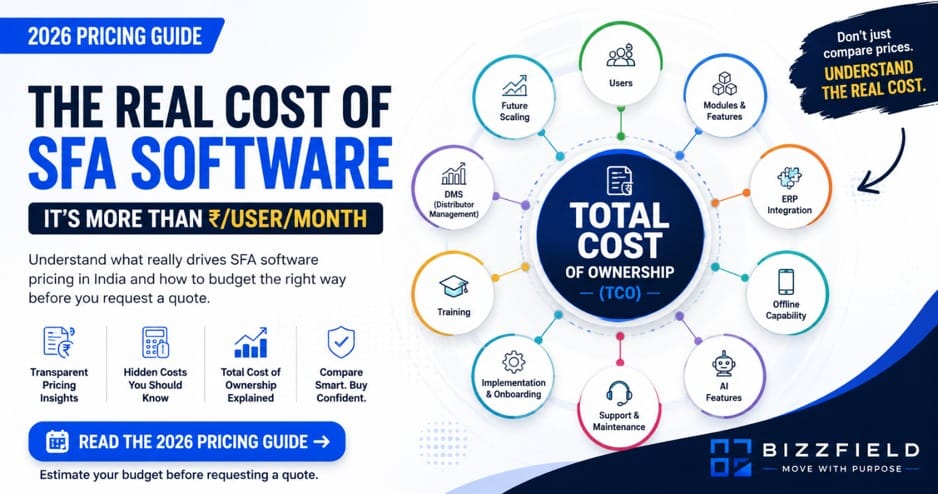
Before comparing numbers, it helps to know what a "price" is actually paying for. Most SFA pricing bundles together three separate cost components, even when vendors quote it as a single number.
Software Licensing
This is the recurring subscription fee — usually charged per user, per month or per year. It covers access to the core platform: field tracking, order booking, attendance, basic reporting, and the mobile app. To see the full breadth of what's typically covered under a field-sales license, explore Bizzfield's Field Force Automation platform.
Implementation & Onboarding
A one-time cost covering account setup, configuration, data migration from spreadsheets or legacy systems, and initial user training. Some vendors fold this into the subscription for small teams; most charge it separately for mid-market and enterprise rollouts.
Support & Maintenance
Ongoing customer support, software updates, and uptime guarantees. Basic email/chat support is often included in the subscription; dedicated account management or SLA-backed support is usually a paid add-on.
Average SFA Software Pricing in India (By Tier)
Pricing tiers in the SFA category tend to cluster around business size and feature depth rather than a fixed price list. The table below shows what each tier generally includes.
| Business Size | Typical Users | Monthly Price Range (per user) | Implementation Fee (one-time, est.) |
|---|---|---|---|
| Solo / Micro business | 1–5 | ₹500 – ₹900 | Often waived or minimal |
| SMB | 5–25 | ₹700 – ₹1,500 | ₹10,000 – ₹50,000 |
| Mid-market | 25–100 | ₹1,200 – ₹2,200 | ₹50,000 – ₹2,00,000 |
| Enterprise | 100+ | ₹1,800 – ₹3,000+ | Custom Quote |
| Highly customized / multi-ERP | Varies | Custom Quote | Custom Quote |
Basic / Starter Tier
Aimed at very small teams. Typically includes GPS-based attendance, basic order booking, and a simple dashboard. Limited or no offline capability, minimal customization, and self-serve onboarding.
SMB Tier
The most common entry point for distribution, FMCG, pharma, and cosmetics businesses with field reps. Usually includes order management, basic Distributor Management System (DMS) features, offline data capture, and standard reporting. Support is typically email/chat with response-time commitments.
Mid-Market Tier
Adds deeper DMS functionality, route optimization, advanced analytics, and one or more integrations (accounting software, basic ERP). Often includes a dedicated onboarding specialist and configurable workflows.
Enterprise Tier
Built for large distributed sales forces. Includes full DMS, multi-ERP integration, AI-driven analytics or forecasting, custom workflow engines, dedicated account management, and SLA-backed uptime and support. Pricing here is almost always quote-based.
Custom / Fully Configured Deployments
For businesses with unique workflows, on-premise requirements, or heavy integration needs (multiple ERPs, custom hardware, bespoke reporting). Pricing is individually scoped and cannot be reasonably estimated without a requirements discussion.
What Factors Affect SFA Software Pricing?
Number of Users & Licensing Structure
The most direct driver. Per-user pricing usually has volume breakpoints — cost per seat often drops as user count increases, though total spend still rises.
Modules (DMS, Attendance, Order Booking, Analytics, etc.)
Core field-tracking and order booking are typically included in every tier. Distributor Management System (DMS), advanced analytics, forecasting, and AI-based recommendations are commonly priced as add-on modules — see Bizzfield's own Distribution Management module for an example of what's typically included.
Offline Capability & Mobile App Requirements
Field reps in low-connectivity areas need robust offline sync. This is a meaningful engineering feature, and vendors that support it well often price it into mid-tier and above rather than the base plan.
Integrations (ERP, CRM, Accounting)
Connecting SFA software to SAP, Tally, or a CRM adds implementation complexity and sometimes ongoing API/integration fees, especially for legacy or heavily customized ERP systems.
Customization & AI Add-Ons
Custom workflows, custom reports, and AI features (demand forecasting, route optimization, anomaly detection) are typically priced above the standard tiers, either as add-on modules or custom quotes.
Deployment Model (Cloud vs On-Premise)
Cloud/SaaS deployment is the default for most Indian SFA vendors and is priced as a predictable subscription. On-premise deployment is far less common today but, where offered, usually involves higher upfront licensing and infrastructure costs with lower recurring fees.
Support Tier & Training
Standard support is usually bundled. Priority support, dedicated account managers, and structured training programs (train-the-trainer, on-site sessions) are common upsells, particularly for larger deployments.
Common SFA Pricing Models Explained
No model is inherently "better" — the right fit depends on how predictable your user count and usage are.
| Pricing Model | How It Works | Best Suited For |
|---|---|---|
| Per User / Per Month | Fixed fee per active user, billed monthly | SMBs, teams with fluctuating headcount |
| Per User / Annual | Same as above, billed yearly (often at a discount) | Businesses wanting cost predictability |
| Quote-Based / Custom | Price scoped individually after a requirements discussion | Enterprise, complex integrations |
| Enterprise Licensing | Flat fee for unlimited or bulk user bands | Large, stable field forces |
| Usage-Based | Cost tied to usage metrics (e.g., transactions, data volume) | Businesses with variable field activity |
| Hybrid | Base subscription + metered add-ons (extra modules, API calls) | Mid-market with evolving needs |
Hidden Costs Buyers Often Miss
These are the line items that turn a quoted "per user/month" price into a bigger real-world bill.
| Hidden Cost | Why It's Often Missed |
|---|---|
| Implementation & setup fees | Frequently quoted separately, sometimes not mentioned until the proposal stage |
| Data migration | Moving historical distributor/customer data can require manual cleanup |
| Training beyond the basics | Ongoing training for new hires isn't always covered after initial onboarding |
| Customization requests | Even small workflow tweaks post-launch can incur developer/config fees |
| ERP/API integration | Complex or legacy ERP systems can require custom integration work |
| Support tier upgrades | Faster response times or dedicated support are often paid add-ons |
| Hardware (devices, scanners) | Some field operations need supported hardware not included in software pricing |
| Future scaling costs | Adding users, modules, or a new business unit later can shift you into a higher tier |
💡 Buyer Takeaway
Always ask for a total first-year cost, not just the per-user monthly rate.
How to Compare Vendor Pricing (Buyer Checklist)
Use this checklist when evaluating quotes from any SFA vendor:
- Does the quote include implementation, or is it separate?
- What exactly is included in the "base" tier vs. paid add-ons?
- Is offline functionality included or an upsell?
- Is DMS (Distributor Management System) included or a separate module?
- What's the cost of adding users later — is there a volume discount?
- Is customer support tiered? What are the response-time commitments?
- What's the contract length, and what are the cancellation terms?
- Are ERP/CRM integrations included, custom-quoted, or unsupported?
- Is training included for new hires after go-live, or only at onboarding?
- Is there a cost to export your data if you switch vendors later?
- Does pricing scale predictably, or does it jump sharply between tiers?
For a deeper walkthrough of this process, see our guide on how to choose the right SFA software. And because pricing models differ as much as the prices themselves, our 2026 comparison of the best SFA software in India sets out which of the major platforms publish rates and which are quote-only — BizzField, Bizom, FieldAssist, PepUpSales and Salesforce, side by side.
Should You Choose the Cheapest SFA Software?
Not necessarily — and not automatically either. The lowest quote can be the right choice for a small team with simple needs, or it can be a false economy if it forces costly workarounds later.
Where the cheapest option often works well:
- Very small teams (under 5–10 field reps)
- Simple use cases: attendance and basic order booking only
- No integration requirements
- Low customization needs
Where the cheapest option often creates problems later:
- Rapid headcount growth (re-negotiating or migrating platforms is disruptive)
- Complex distributor networks needing a real DMS
- ERP integration requirements
- Compliance or audit needs requiring robust reporting
A more useful question than "what's the cheapest option?" is "what's the lowest total cost that still meets our requirements for the next 18–24 months?"
How to Estimate Total Cost of Ownership (TCO)
Total Cost of Ownership (TCO) is the full cost of running the software over a defined period — not just the subscription fee. A simple formula:
🧮 TCO Formula
TCO = (Per-user monthly fee × users × 12) + Implementation fee + Add-on modules + Training + Integration costs − Any discounts
Sample TCO Calculation (Illustrative)
The figures below are a hypothetical example for a fictional 20-person field team, used only to illustrate the calculation method. They are not a quote or a benchmark for any specific vendor.
| Cost Component | Illustrative Estimate |
|---|---|
| Subscription: 20 users × ₹1,200/month × 12 months | ₹2,88,000 |
| Implementation & onboarding (one-time) | ₹40,000 |
| DMS module add-on (annual) | ₹60,000 |
| Basic ERP integration (one-time) | ₹35,000 |
| Training (initial + 1 refresher session) | ₹15,000 |
| Estimated Year 1 TCO | ₹4,38,000 |
| Estimated Year 2+ (subscription + module only) | ₹3,48,000/year |
This kind of breakdown — not just the headline per-user number — is what you should be asking every vendor for.
A Hypothetical ROI Example
This example is illustrative only and does not represent guaranteed or typical results. Actual ROI depends on your team, processes, and how the software is adopted.
Imagine a distribution business with 20 field reps, each spending roughly 45 minutes a day on manual reporting and order-writing. If SFA software reduces that to 15 minutes a day through mobile order booking and automated reporting:
- Time saved per rep: ~30 minutes/day × 22 working days = 11 hours/month
- Across 20 reps: 220 hours/month recovered
- If reps also spend that time on additional customer visits, even a modest 5–10% increase in order volume could offset the software's annual cost within the first year for many field-sales operations.
This is a simplified, hypothetical model meant to illustrate how to think about ROI — not a promised outcome. Actual results should be modeled against your own baseline metrics.
Questions to Ask Before Requesting a Quote
Coming to a sales conversation with these answers ready will get you a faster, more accurate quote:
- How many field reps/users will need licenses today, and in 12 months?
- Do you need a Distributor Management System, or just field tracking and order booking?
- Which systems need to integrate (ERP, accounting, CRM)?
- Do your field teams operate in low-connectivity areas (offline capability needed)?
- What level of support and SLA do you require?
- Do you have existing data that needs migration?
- Is on-premise deployment a requirement, or is cloud acceptable?
- What's your realistic budget range for Year 1 vs. ongoing years?
How Bizzfield Approaches Pricing
Bizzfield prices its SFA platform based on the same core variables covered in this guide — number of users, modules required (including DMS and offline capability), integration complexity, and support level — rather than a single flat rate. This is intentional: a 10-person distribution business and a 200-person enterprise field force have fundamentally different requirements, and a one-size-fits-all price tends to either overcharge small teams or undersell enterprise deployments.
Rather than publish a number that wouldn't be accurate for most businesses, Bizzfield scopes pricing after understanding your team size, workflows, and integration needs.
Conclusion
SFA software pricing in India isn't opaque by accident — it reflects genuinely different requirements across businesses. The most useful thing you can do as a buyer isn't to chase the lowest number, but to understand the cost components (licensing, implementation, support), map them against your actual needs, and compare vendors on total cost of ownership rather than a single headline figure. Use the checklist and TCO framework in this guide with every vendor you evaluate, including Bizzfield.
🚀 Get a Scoped Quote
If you'd like pricing based on your actual team size, workflows, and integration needs rather than a generic range, the Bizzfield team can walk through your requirements and provide a tailored quote. Contact us for a personalized consultation.
Bizzfield Sales Ops Team
The Bizzfield Sales Ops team works directly with FMCG field sales leaders across India to diagnose the operational bottlenecks that quietly cut into sales targets and fix them with Sales Force Automation.
Frequently asked questions
Most cloud-based SFA platforms in India cost ₹500–₹3,000 per user per month, depending on features, scale, and support level. Enterprise deployments are typically custom-quoted.
Number of users, modules required (especially DMS), integration complexity, offline capability, customization, and support tier are the primary drivers of SFA software pricing.
It's usually extra. Most vendors charge implementation as a separate one-time fee, particularly for mid-market and enterprise rollouts, though some smaller-team plans include basic onboarding at no additional cost.
Both billing models exist. Monthly billing offers flexibility, while annual billing typically comes with a discount in exchange for a longer commitment.
SMBs with 5–25 users typically pay ₹700–₹1,500 per user per month, plus a one-time implementation fee of roughly ₹10,000–₹50,000.
Enterprise SFA pricing can exceed ₹3,000 per user per month and is generally quote-based, reflecting custom integrations, dedicated support, and higher user volumes.
Cloud/SaaS pricing is a predictable recurring subscription and is usually the cheaper, more common choice. On-premise deployments, where offered, typically involve higher upfront costs and lower recurring fees.
Initial training is usually included during onboarding, but ongoing training for new hires or refresher sessions is frequently a separate cost — confirm this with any vendor before signing.
Yes. Pricing can change at renewal, when adding users or modules, or if your plan changes — always clarify renewal terms and price-lock commitments before signing.
Contract lengths vary by vendor, with common structures including month-to-month, annual, and multi-year agreements, often at different price points depending on the term.
Usually not. DMS is frequently sold as a distinct module or a higher-tier feature rather than part of the entry-level plan.
TCO is the full cost of the software over a given period — subscription fees, implementation, add-on modules, training, and integration costs — not just the advertised per-user price.
It varies widely, from minor workflow adjustments to custom-built modules, and is typically quoted individually rather than included in standard pricing.
Support responsiveness, offline reliability, integration capabilities, ease of use for field reps, data export/ownership terms, and contract flexibility all materially affect the real value of a platform.
Not always. A lower price can be the right fit for very simple needs, but it can also lead to costly workarounds, migrations, or missing functionality as a business scales.
Yes. Some vendors price based on usage metrics, such as order volume or data usage, rather than — or in addition to — per-user fees, particularly for businesses with variable field activity.
Many do. Annual billing discounts and volume-based per-seat pricing as user counts increase are common, though exact structures vary by vendor.
Most vendors allow adding users at the standard per-seat rate — confirm this contractually, including whether volume discounts apply retroactively.
Some vendors offer free trials or limited free tiers; availability and scope vary and should be confirmed directly with each vendor.
The most accurate figure comes from a scoped quote, since pricing depends on your user count, modules, and integration needs.
WRITTEN BY
Shivam Gupta
Brand Manager
Brand Manager with 8+ years of experience in building brands, developing growth strategies, and creating impactful marketing campaigns that drive business success.
Connect on LinkedIn