

CONNECTED HRMS WITH INTEGRATED PAYROLL
One Connected HRMS.
Attendance To Payslip.
Onboarding To Exit.
BizzField HRMS brings employee lifecycle, attendance, leave, payroll and compliance into one system, so approved attendance and leave feed the pay run, not spreadsheets.
BUSINESSES RUNNING ON BIZZFIELD














CONNECTED HR MODULES
HR Modules That Share One Employee Record
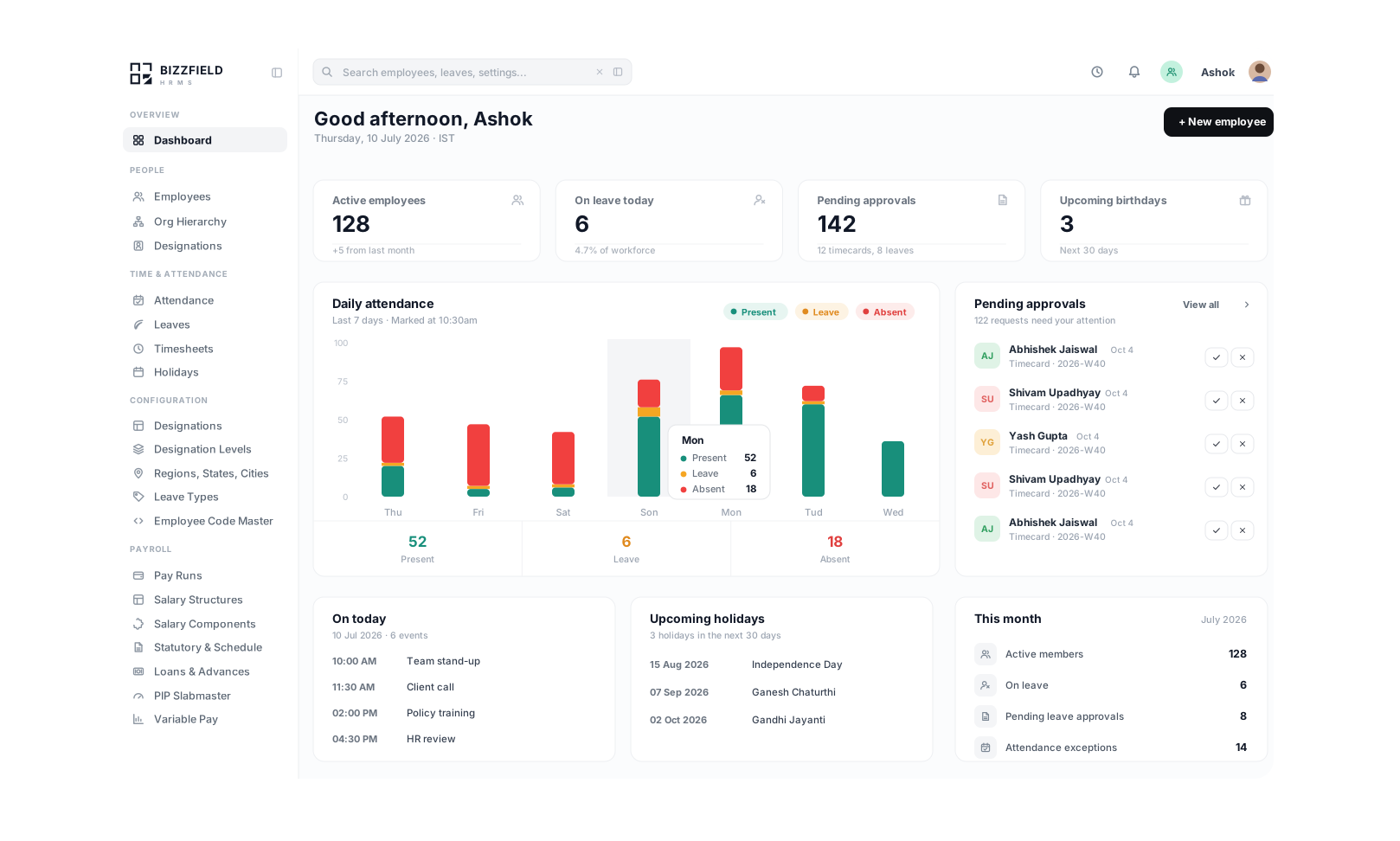
SAMPLE DASHBOARD
Your Workforce At A Glance
Headcount, attendance, payroll and approvals read from one employee record. Illustrative data.
Team Composition
This Week's Highlights
ONE EMPLOYEE RECORD, FIVE STAGES
The Employee Lifecycle, Stage By Stage
Onboarding, attendance to payroll, leave and timesheets, appraisals and revisions, and exit all read from the same record. Approved attendance feeds the pay run, a back-dated revision flows into Retro Pay, and an exit starts the final settlement.
Employee Lifecycle
Stage Metric
One Record, Created Once, Read By Every Module
HR creates the employee record once, with statutory IDs, documents, assets, employee code and reporting line. Attendance, leave and payroll then read from that record, not from separate sheets.
What This Stage Covers
- Offer letter & appointment paperwork
- Identity & statutory documents verified
- Asset allocation (laptop, SIM, badge)
- Employee code & portal access setup
- Welcome email + ESS app access
- Department & reporting line assignment
- 01Offer Letter IssuedOffer paperwork attached to the record
- 02Documents VerifiedStatutory IDs and documents checked
- 03Employee Code GeneratedEMP-2026-0482 assigned
INDUSTRY WORKFLOWS
HRMS For How Your Sector Actually Runs Payroll
Shift pay, billable hours and branch networks each put different pressure on payroll. These two examples show how one employee record serves them; the industries page covers all six sectors.
PLANT WORKFORCE
Manufacturing & Industrial Operations
Key Capabilities
- Rotational shift rosters per department
- Overtime flagged against configured daily and weekly limits
- Attendance freeze before the pay run closes the cycle
- Plant-level reporting hierarchy scoping per facility
Shift-based rosters, overtime recorded against the assigned shift and supervisor approval, with approved hours carried into the pay run.
See HRMS For ManufacturingKNOWLEDGE WORKERS
IT, Technology & Remote Teams
Key Capabilities
- Weekly project timesheets approved by the reporting manager
- Old vs New Tax Regime investment declarations
- Professional Tax applied by each employee's work location
- Reporting lines decide who approves what
Reporting-line approvals, billable project hours on timesheets and tax declarations, all handled on the same employee record.
See HRMS For IT & ITESPLATFORM COMPARISON
Spreadsheets Versus One Connected HRMS
What changes when attendance, leave and payroll read from one employee record instead of separate files.
With BizzField HRMS
- Approved attendance and leave feed the pay run without re-keying
- Managers see only their own reporting hierarchy, enforced on the server
- Leave without pay reaches the next pay run as a deduction
- Variance checks flag unusual pay before a run is approved
With Spreadsheets And Paper Logs
- Hours every month re-keying attendance and leave into payroll sheets
- Employee data shared over email, with no role-based permissions
- Overtime, claims and loans tracked in separate files
- Attendance logs and payslips disagree, and the gap surfaces at month end
HOW IT CONNECTS
Three Workflows That Run On One Employee Record
Attendance, revisions and exits each follow one path, with no re-keying between steps.
FREQUENTLY ASKED QUESTIONS
Questions HR And Finance Teams Ask About BizzField HRMS
Answers on privacy, attendance, leave, self-service, exits, statutory deductions and payroll connections, including what is planned and not live.
Data handling is designed around the principles of India's Digital Personal Data Protection Act. That describes how data is handled; it is not a certification. Employee records, bank details and document files are encrypted at rest with AES-256, and access is scoped on the server from the org hierarchy, so a manager sees only their own reporting tree. Consent logging, data export and deletion rights are supported. SOC 2 Type II and ISO 27001 are in progress and not yet held.
Not yet. Biometric device sync (ZKTeco and Essl) is on the roadmap and is not live. Today employees check in from web or mobile, scoped to themselves, and approved attendance and overtime feed the pay run.
HR configures casual, sick, earned, maternity and custom leave types with accrual schedules and carry-forward limits, and sandwich rules apply where configured. Leave without pay reaches the next pay run as a deduction, and leave encashment is calculated from the live leave balance.
Yes. Employees use self-service on the web and in the mobile app to check in, apply for leave, check balances, download current and past payslips and upload receipts for expense claims.
Recording an exit starts offboarding on the same record: clearance checklists, notice-period tracking and asset handover. The settlement is computed from records already on file: final salary, leave encashment, notice-period recovery and any outstanding loan balance. It is reviewed like a regular run and paid out to close the record.
Yes. Reporting lines are defined per employee and decide who approves and who can see what: managers see attendance and leave only for their direct and indirect reports. State rules for Professional Tax and LWF follow each employee's work location.
Appraisals use KRAs, OKRs and 360° ratings. An approved increment becomes a Salary Revision with an effective date. If that date falls in a cycle that has already been paid, Retro Pay works out the arrears and adds them to the next pay run.
Yes. Shift patterns and rotational rosters are maintained in a shift master, and overtime is recorded against each employee's assigned shift and carried into pay. Night shift allowance calculations are tied to payroll.
PF, ESI, Professional Tax, TDS and LWF are calculated on every pay run, with state rules following each employee's work location. The Code on Wages' 50% allowance cap is applied to the PF and gratuity wage base. Tax declarations, the payroll calendar, compliance summaries and a Form 24Q export all read from the same payroll data.
Payroll is part of BizzField HRMS on the Growth plan, so attendance, leave and exit data reach the pay run without re-keying. Payroll outputs include EPFO ECR text files, PF and ESI challan data and a Form 24Q export. Accounting exports to Tally Prime and Zoho Books, and bank salary file push, are planned and not live.
See BizzField HRMS Connect Attendance To Payslip
See attendance, leave and payroll on one employee record. Join the 500+ businesses running on BizzField.