

Textile SFA software (sales force automation software) is a mobile-first system that helps businesses manage dealer visit planning, digital order booking, sales activity tracking and performance reporting in one place. For textile manufacturers, wholesalers and apparel distributors, it replaces fragmented WhatsApp messages, handwritten order notebooks and manual end-of-day reporting with a single, verifiable operational record.
It's Thursday morning. Your regional sales manager opens the team WhatsApp group and finds 60-odd unread messages: order photos from a notebook, a few “visited 12 dealers, will send report tonight” updates, and a voice note nobody has time to play. Meanwhile, the new collection launched last week, and you still can't say which dealers have actually seen it.
For textile manufacturers, wholesalers and apparel distributors, the challenge isn't getting reps into the field. It's keeping dealer visits, order booking and territory coverage organised as collections and priorities change.
Textile SFA software (sales force automation software) is a mobile-first system that helps businesses manage dealer visit planning, digital order booking, sales activity tracking and performance reporting in one place. This guide covers what textile and apparel businesses should evaluate, what to verify before implementation, and how to judge whether BizzField SFA fits your distribution model.
What Is Textile & Apparel SFA Software?
SFAcovers the everyday work of a field rep: planning the day's route, checking in at a dealer, showing the collection, taking the order, noting what the dealer said, and reporting back.
How is that different from a CRM? A CRM focuses on relationships and pipelines: leads, contacts, deal stages. Textile SFA focuses on execution. Did the rep reach the dealer? What did the dealer order? Who is overdue for a visit? The two can overlap, so the right choice depends on whether you need relationship management, field execution, or both.
Why Do Textile and Apparel Businesses Need Sales Automation?
Textile selling has its own rhythm. Collections change by season, dealers are spread across towns and wholesale markets, and the same dealer may need three visits before an order is finalised.
- Dealer visits across many territories.It's hard to see who was visited recently and who has quietly dropped off the map.
- Seasonal collections. A new collection means a burst of visits and orders in a short window. If orders sit in notebooks and chats, follow-ups slip when timing matters most.
- Inconsistent order records. One rep writes in a diary, another sends a photo, a third calls the office. Someone has to piece it together, and errors creep in.
- Limited visibility. Managers often learn on Monday what happened last week.
- Manual reporting. Reps rebuild their day from memory in the evening; managers clean up results in the morning.
- Patchy territory coverage. Gaps show up only when a dealer complains or a quarter ends short.
None of these is dramatic alone. Together they make it hard to run a field team with confidence.
How Does Field Sales Automation Work in Textile Distribution?
Consider a manufacturer launching a new collection through wholesalers and retail dealers across several cities. The rep needs to visit the right dealers, record orders accurately and follow up where more time is needed. The regional manager needs to know which visits happened and where attention is required. A structured SFA workflow supports this in five steps:
- Plan dealer visits by territory, dealer priority and planned frequency.
- Record the dealer interaction, including visit activity and follow-up requirements.
- Record the order digitally, where the software supports the product and variant detail you need.
- Track pending follow-ups so open conversations stay visible instead of depending on individual reminders.
- Review field performance by comparing planned visits, completed activity and recorded orders.
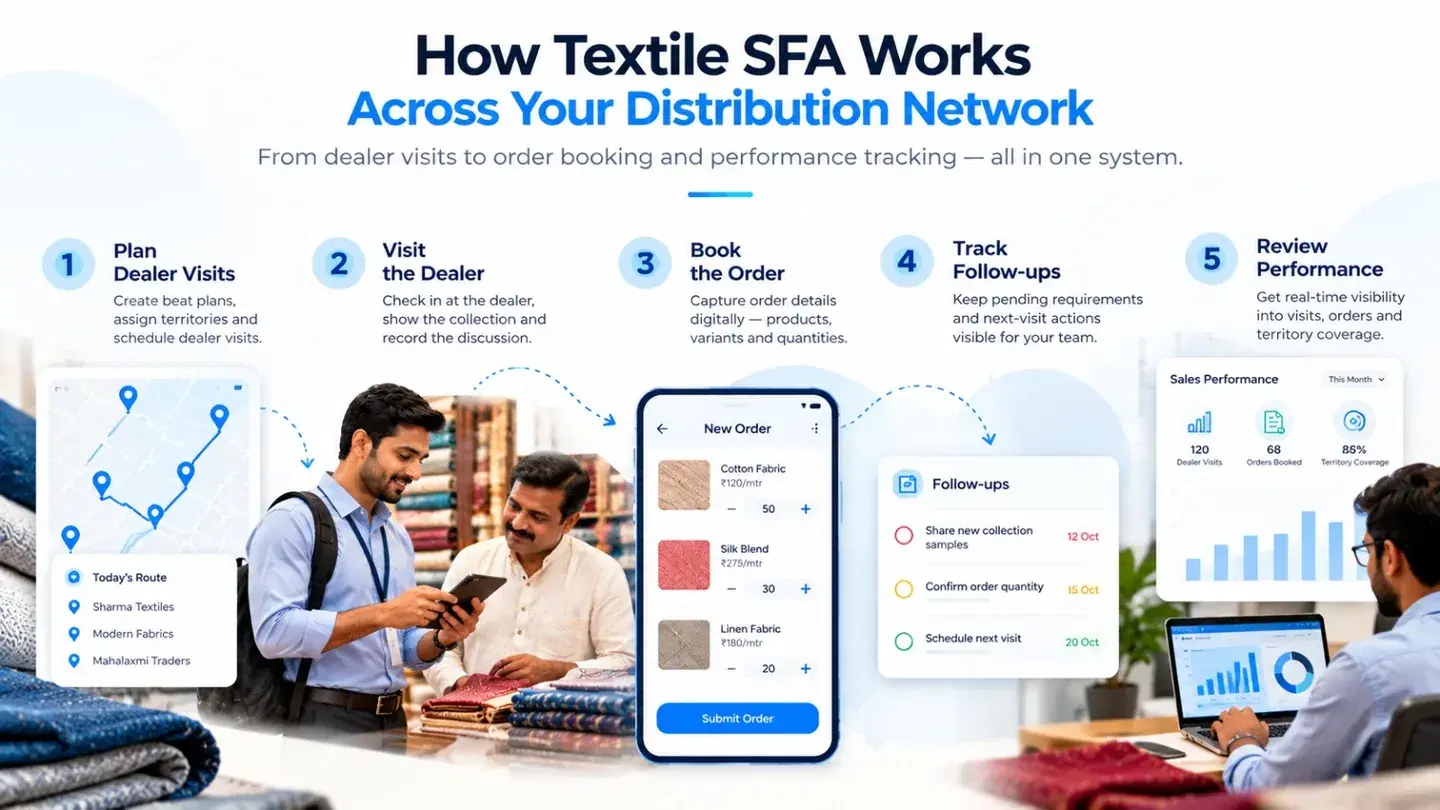
The important distinction is between recording a dealer order and managing the full product assortment. A garment distributor may need size- and colour-wise variants. A fabric wholesaler may need product specifications and repeat ordering. A system that handles field visits well may still need a separate or integrated workflow for specialised product and inventory management.
To be clear, these are potential improvements, not guaranteed results. Outcomes depend on how well the tool fits your process and how consistently your team uses it.
Key Features to Evaluate in Textile Sales Automation Software
Not every SFA tool suits textile selling. For each capability below: what it does, why it matters, and what to check.
Dealer and Retailer Visit Management
Planned visits, visit records and follow-up reminders maintain coverage. The real value is continuity: when a rep says “I'll come back Thursday with the new samples,” that promise lives in the system, not in someone's head.
What to check: Can managers review planned versus completed visits and see the recorded outcome of each interaction?
Field Sales Tracking and GPS-Based Attendance
Location-based check-ins show that a visit happened, where and when. For managers handling large territories, this replaces “trust me, I was there” with a record and makes coaching easier. Attendance alone doesn't show whether a visit was productive, so review it alongside order and follow-up data.
What to check: Does the system record the required check-in details, and can managers review them in reports?
Digital Order Booking for Textile and Apparel Businesses
Digital order capture records the order at the dealer's counter instead of rewriting it later, cutting handwritten notes, scattered messages and transcription mistakes. For apparel, ask harder questions: can the tool handle SKU-level detail, sizes, colours and seasonal collections? A fabric wholesaler may need product-specific specifications instead.
What to check: Can it handle your actual catalogue, units, variants, pricing rules and order approval process?
Territory Management and Beat Planning
Assigning territories and building visit routes keeps coverage organised. A good beat plan means every dealer is seen at the right frequency and no two reps overlap by accident. For textile teams, it helps if plans can be adjusted around collection launches and festive demand.
What to check: Can you assign dealers by territory, adjust plans, and spot missed or overlapping visits?
Sales Performance Reporting
Centralised reports let managers review visits completed, orders booked and rep-wise activity without chasing anyone. They're most useful when they expose gaps such as incomplete visits, open follow-ups, or differences between planned and recorded activity.
What to check: Can your NSM, RSM and ASM each see the metrics relevant to their role?
Mobile Access and Offline Functionality
Reps work from dealer shops, godowns and market lanes, not desks. A complicated workflow discourages timely data entry, and connectivity can be unreliable outside metro cities.
What to check: Which functions work offline, and how does data sync after reconnection?
How to Choose the Right Textile SFA Software in India
Feature lists look similar on paper. This checklist helps separate “has it” from “works for us.”
- Fit with your dealer model. Distributors, direct dealers, wholesalers, or a mix?
- Core field workflows. Visits, order booking and territory management should work smoothly, not just exist.
- Product and seasonal workflows. If you need SKU, size, colour or collection-based ordering, ask to see it live.
- Mobile and offline usability.Test it on your reps' phones, in their markets.
- Reporting and visibility. Can each management level see what it needs?
- Integrations. If you use ERP, accounting or inventory systems, confirm exactly what connects and how.
- Onboarding and support. Who sets it up, who trains your team, and what happens after go-live?
- Total cost. Look beyond per-user price to setup, add-ons and scaling.
Don't decide from a feature table. Ask the vendor to demonstrate one real scenario end to end: a dealer visit, a seasonal order, the approval step and the resulting management report. Ten minutes of that tells you more than ten pages of brochures.
Is BizzField SFA Suitable for Textile and Apparel Distribution?
If you're comparing options, BizzField Sales Force Automation software is worth evaluating. Based on what BizzField currently lists for textile and apparel teams, it supports:
| Business requirement | What to validate in a demo |
|---|---|
| Dealer coverage | Can the team plan and review dealer visits by territory? |
| Order booking | Can reps record the required product, quantity and pricing details? |
| Product variants | Are sizes, colours or fabric specifications supported? |
| Seasonal collections | Can the workflow handle collection-specific requirements? |
| Field visibility | Can managers see visit activity and outstanding follow-ups? |
| Connectivity | Which functions work offline, and how does sync work? |
| Existing systems | Are the ERP, accounting or inventory integrations you need available? |
| Reporting | Can managers access the metrics needed to assess field execution? |
| Implementation | What configuration, training, support and extra costs are involved? |
- GPS-verified dealer and retailer visits, with location and time recorded at check-in.
- Beat plan management, with routes assigned by territory, dealer cluster and outlet potential, plus beat adherence tracking. See the route management module.
- Mobile order booking at the point of visit, with a product catalogue in the app and scheme display. Read more on retailer order management.
- Offline working, so reps can check in and book orders in low-connectivity areas and sync later. Details on the offline field sales app page.
- Manager dashboards for visits, orders and territory performance. See sales reporting and analytics.
- Distributor stock and secondary sales visibility through its distribution management capabilities.
In practice, that covers the daily loop most textile field teams care about: plan the beat, visit the dealer, book the order, report the outcome, and let managers see it.
A few things are best confirmed in a demo rather than assumed: garment size and colour matrix ordering, seasonal assortment planning, fabric-specific product details, dealer-level order history and connections with your specific ERP. BizzField lists its available connections on the integrations page; if any of these are must-haves, ask the team to show them working. Explore BizzField SFA.
Ready to Improve Visibility Across Your Textile Sales Network?
Managing dealer visits, capturing orders and reviewing field performance gets easier when your sales workflows are structured around your business requirements. Explore how BizzField SFA could support your field sales operations, dealer coverage and order-booking process.
Book a BizzField demo to discuss your sales team structure, distribution model and software requirements.
Frequently asked questions
Textile SFA software helps manufacturers, wholesalers and distributors manage field sales activities such as dealer visits, territory planning, order capture and sales reporting. A CRM focuses more broadly on customer relationships and sales pipelines, though the two can overlap. The right choice depends on whether you mainly need relationship management, field execution, or both.
That depends on the product. Apparel businesses may need size-and-colour variants, while textile businesses may have other product-specific requirements. Confirm that the catalogue and order-booking workflows support the exact combinations, units and collection details your team uses.
Evaluate dealer visit planning, digital order booking, territory coverage, mobile usability, offline functionality, reporting, integration needs and implementation costs. Also test industry-specific needs such as product variants, repeat orders and seasonal workflows. A demo using a real sales scenario is more informative than a feature list.
Yes, it can be useful for wholesalers and distributors who manage field representatives, dealer networks, repeat visits and distributed order booking.
Request a demo and talk through your dealer network, team structure, order-booking process, territory coverage and integration needs. That's the quickest way to judge fit.
WRITTEN BY
Urvashi Srivastav
VP, Business Management & Client Relationships
VP at BizzField, working across business management and client relationships — building strong partnerships, streamlining operations and driving business growth.
Connect on LinkedIn