

PAYROLL SOFTWARE FOR INDIA
Run Payroll.
Not The Month-End
Fire Drill.
BizzField Payroll is a standalone payroll product for Indian businesses. It runs a controlled cycle, calculates PF, ESI, PT, TDS and LWF by work location, and gives employees payslips through self-service.
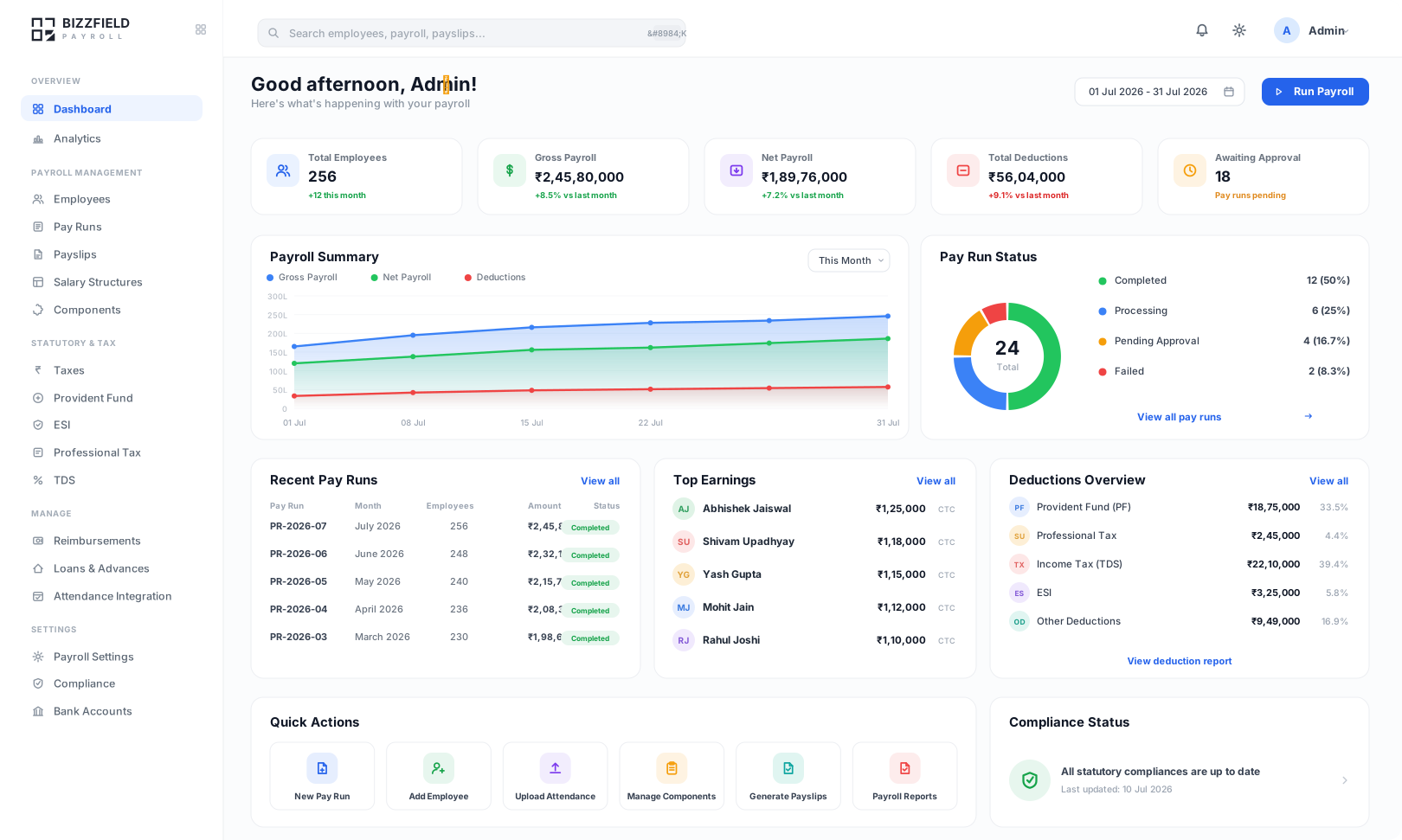
Controlled Pay Runs
A draft register, variance review and maker-checker approval before release.
Statutory Calculations
PF, ESI, PT, TDS and LWF at current rates, applied by work location.
Employee Self-Service
Payslips, tax declarations and proofs, without an HR ticket.
Audit Trail
Revisions, approvals and reversals are recorded and open to review.
BUSINESSES RUNNING ON BIZZFIELD




















WHAT PAYROLL COVERS
One pay cycle, from salary structure to payslip
Salary changes, loans, claims and statutory rules usually arrive from different places. These capabilities keep them in one cycle.
A Controlled Monthly Pay Run
Lock attendance, draft the register, review variance and take maker-checker approval before anything is released.
Salary Structure & CTC Revisions
Build structures from components such as Basic, HRA and Special Allowance, with effective-dated revisions that compute arrears.
Statutory Deductions By Location
PF at 12% with voluntary PF, ESI up to the ₹21,000 monthly ceiling, and state PT and LWF slabs applied by work location.
TDS, Old vs New Tax Regimes
Employees declare and upload proofs, payroll reviews them, and monthly TDS follows the chosen regime. Form 16 and Form 24Q exports.
Loans, Advances & Reimbursements
Loans and advances recover automatically through payroll. Approved claims are paid in the cycle with the right tax treatment.
Bank Files & Accounting Exports
Bank-format salary files generated from the approved register, plus General Ledger exports for Tally Prime and Zoho Books.
PAYROLL MODULES
Built as modules, run as one cycle
HOW A CYCLE RUNS
Five steps from attendance lock to bank file
The same sequence every month, with variance review and maker-checker approval before anything is released.
Step 01
Lock attendance and leave
Attendance, leave and overtime are frozen for the cycle, and loss-of-pay is derived from them rather than typed in.- Read from BizzField HRMS or imported attendance data
- Unpaid days derived from the records
- A late correction needs a logged unlock and a recalculation
Step 02
Generate the draft register
Every component is recalculated for every employee, including mid-month joiners, exits and revisions, into a draft.- Arrears computed from effective dates
- PF, ESI, professional tax and TDS applied by work location
- The draft can be discarded and rebuilt until it is approved
Step 03
Review variance, not every line
The draft is compared with the previous cycle, so reviewers spend their time on the employees whose pay moved.- Employees above a variance threshold are flagged for review
- New joiners, exits and revisions are listed separately
Step 04
Maker-checker approval
The person who prepared the cycle is not the person who releases it, and each approval is recorded against a named user.- Preparer and approver are separate roles
- A rejection returns the cycle to draft with a reason
Step 05
Release payslips and the bank file
Payslips and the bank-format salary file are produced from the same approved register.- Payslips published to employee self-service on release
- Bank file generated from the approved register
- PF ECR and Form 24Q files produced from the same figures
GROSS-TO-NET EXAMPLE
From CTC To Net Pay: A Worked Example
Choose an annual CTC and a tax regime to see how gross pay, PF, ESI, professional tax and TDS combine into net pay. This is a simplified illustration, not a payslip.
Monthly Payslip Breakdown
Choose a CTC and tax regime. A simplified example: CTC is treated as gross pay, TDS is a flat rate with no rebate or cess, and PT uses one sample slab.
Monthly Gross Breakdown
Statutory Deductions
Monthly Net Take-Home
Net pay payable to the employee
STATUTORY COMPLIANCE
Statutory deductions calculated by work location
Provident fund, employee state insurance, professional tax, labour welfare fund and TDS, each with its own rate and ceiling. State rules follow the work location.
PROVIDENT FUND & ESI
PF, ESI And Return Files
Key Capabilities
- PF ECR file produced from the pay run
- ESI contribution return
- Voluntary PF contributions
- Labour Welfare Fund by state
PF is calculated on basic wages at 12% each for employee and employer, respecting the statutory monthly ceiling. ESI is 0.75% employee and 3.25% employer for employees earning up to ₹21,000 a month. The ECR file and the ESI return are produced from the same pay run.
See PF ManagementINCOME TAX
TDS, Old And New Regime
Key Capabilities
- Tax liability comparison during investment declaration
- Section 80C, 80D and HRA proofs approved or rejected
- Form 24Q assembled from the quarter's cycles, not re-keyed
- Form 16 Part A and Part B at year end
Employees compare their liability under the Old and New regimes when they declare investments, finance approves or rejects each proof, and monthly TDS follows the regime chosen. Form 24Q is assembled from the quarter's cycles.
See TDS CalculationINCOME TAX REGIME COMPARISON
Old vs New Tax Regime: What Changes For Employees
Employees elect a regime when they declare investments, and monthly TDS follows that election. The table summarises the main differences between the two regimes.
| Feature | Old Tax Regime | New Tax Regime (FY 2025-26) |
|---|---|---|
| HRA Exemption | ✓ Available | ✗ Not available |
| 80C Deductions | Up to ₹1.5L | ✗ Not available |
| Standard Deduction | ₹50,000 | ₹75,000 (enhanced) |
| Tax-free Slab | Up to ₹2.5L | Up to ₹4L (rebate 87A) |
| Peak Surcharge | 37% above ₹5Cr | 25% above ₹5Cr |
| Best For | High deductions & HRA | Lower income or few investments |
PLATFORM COMPARISON
Payroll On Spreadsheets Versus A Controlled Cycle
What changes when attendance, salary changes and statutory rules feed one pay cycle instead of separate files.
With A Controlled BizzField Cycle
- Loss-of-pay derived from locked attendance, not typed in
- Variance review flags employees whose pay moved before approval
- A second person approves before payslips and the bank file are released
- Payslips published to employee self-service on release
With Payroll Spreadsheets
- Hours spent cross-checking loss-of-pay formulas across attendance files
- Statutory ceilings and state slabs maintained by hand in formulas
- Bank files rebuilt in Excel after payroll closes
- ECR and Form 24Q assembled from separate monthly sheets
WHERE PAYROLL GOES WRONG
Payroll Errors A Controlled Cycle Is Built To Catch
Missed loss-of-pay entries, formula errors, wrong state slabs and late corrections are the usual causes of rework. Locked inputs, variance review and a second approver are there to catch them before release.
Missed LOP deductions: Unapproved absences never reach payroll, so salary is overpaid and hard to recover.
Spreadsheet formula errors: Manual formulas miscalculate HRA exemptions, PF ceilings or state PT slabs during pay runs.
Return files built by hand: ECR and Form 24Q assembled from separate sheets do not match what payroll deducted.
Bank files built by hand: Salary files rebuilt in Excel after payroll closes lead to rejected credits and late salaries.
FILES FROM THE APPROVED PAY RUN
Bank Files, Return Files And Accounting Exports
Files are produced from the approved register, so they are not rebuilt in Excel after the run. Submission to each portal stays with your finance or compliance team.
Bank Salary Files
A bank-format salary file generated from the approved register, with formats for HDFC, ICICI and SBI.
General Ledger Export
General Ledger data exported for Tally Prime and Zoho Books from a locked pay run.
PF ECR And ESI Return
The ECR file and the ESI contribution return, produced from the same pay run.
Form 24Q Return File
The quarterly TDS return assembled from the quarter's cycles in Form 24Q format.
AT A GLANCE
How Every Pay Cycle Is Set Up
The structure behind each cycle.
FREQUENTLY ASKED QUESTIONS
Payroll Questions We Get Asked
Answers on statutory deductions, tax regimes, bank files, attendance, retro pay and return files, including what stays with your team.
PF is calculated on basic wages at 12% each for employee and employer, respecting the statutory monthly ceiling, and voluntary PF is supported. ESI is 0.75% employee and 3.25% employer for employees earning up to ₹21,000 a month. Professional tax and labour welfare fund slabs are applied by each employee's work state, not the head office.
Yes. Employees declare investments and compare their liability under both regimes, finance approves or rejects each proof, and monthly TDS follows the regime chosen. Form 24Q is assembled from the quarter's cycles, and Form 16 Part A and Part B are available at year end.
BizzField generates a bank-format salary file from the approved register, formatted to the bank's upload specification. Formats are available for HDFC, ICICI and SBI, and employees are grouped by salary-account bank, so a separate file is produced per bank.
BizzField Payroll is a standalone product. It can read attendance and leave from BizzField HRMS or from imported attendance data. Once attendance is locked for the cycle, unpaid days are derived from the records instead of typed in, and a late correction needs a logged unlock and a recalculation.
BizzField Payroll can export General Ledger data for Tally Prime and Zoho Books from a locked pay run.
Five steps. First, attendance and leave are locked. Second, a draft register is generated for every employee. Third, the draft is compared with the previous cycle so reviewers see only the exceptions. Fourth, a second person approves it through maker-checker approval. Fifth, payslips and the bank file are released from the approved register.
HR records the loan with its principal, interest rate where applicable and repayment tenure. The monthly EMI is deducted from each payslip during the repayment period, and the outstanding balance is tracked against the loan.
Retro pay arises when a salary revision is approved with a past effective date. BizzField works out the difference for each affected month, adds the arrears to the next payroll, and re-projects TDS for the rest of the year.
After each pay run, BizzField produces the electronic challan-cum-return (ECR) file from the same figures payroll deducted. Submission to the EPFO portal stays with your finance or compliance team.
Yes. Incentive rules are defined as a plan, achievement data is recorded, and the approved amount is added to the specified month's payroll. Variable pay history is kept for each employee.
No. BizzField Payroll is a standalone product with its own pricing. It can consume attendance from BizzField HRMS or from imported attendance data, and it does not require HRMS to run.
BizzField produces the return files reconciled to your payroll. Submission to the respective portal remains with your finance or compliance team.
Ready to Close Payroll Without the Scramble?
Walk through a full cycle with our Kanpur-based payroll team, from attendance lock to payslips.