

BizzFieldCRM

SALES PIPELINE MANAGEMENT

One Sales Process On Paper. A Different One In Every Rep's Head.

A spreadsheet stage column drifts the moment two reps interpret it differently. BizzField gives you structured, reorderable pipelines with real Won and Lost terminal stages, so every deal moves through the process you actually designed.
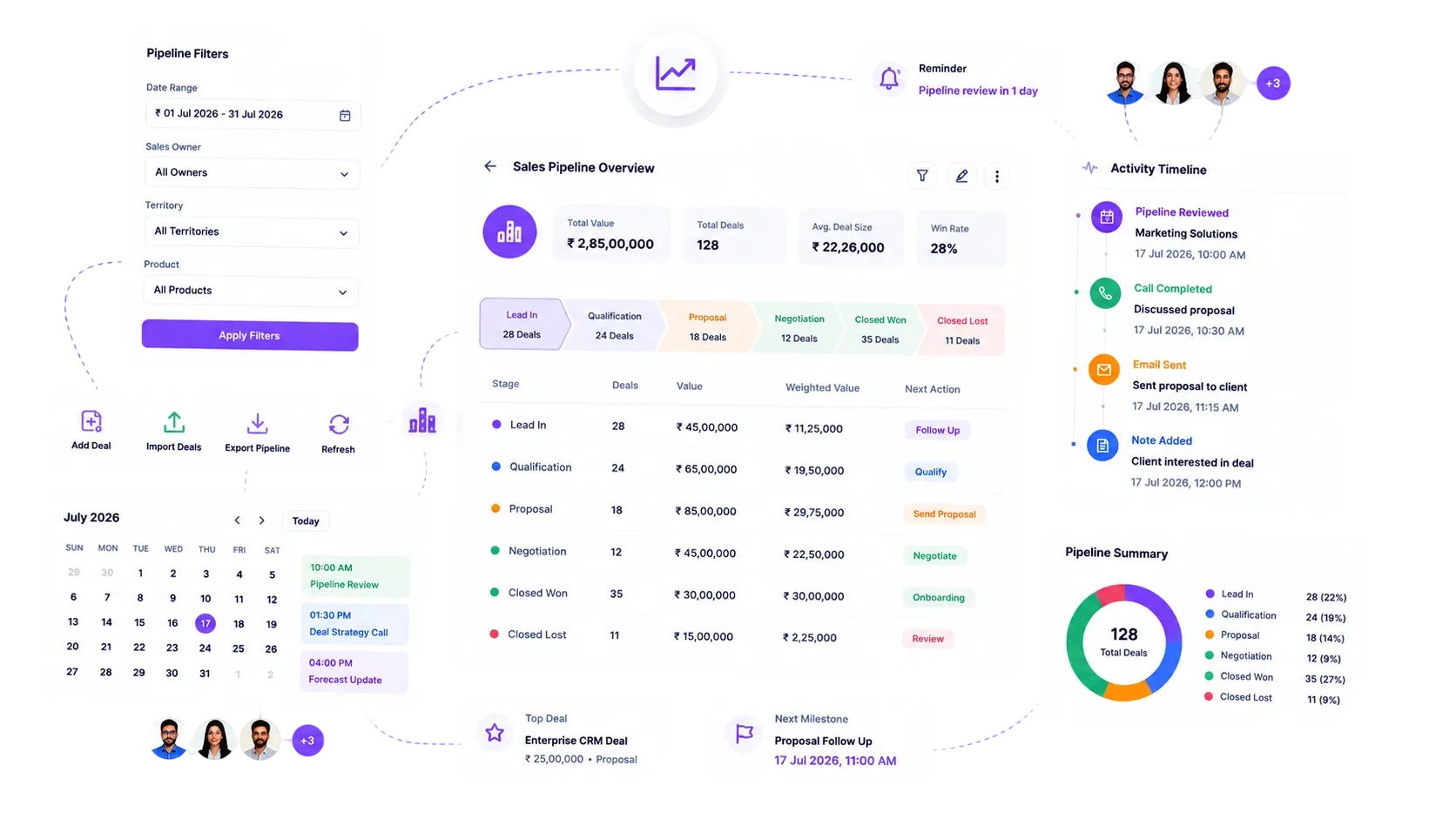
BizzField CRM sales pipeline showing deals distributed across stages with values and win probability
4Currencies supported
2Board views: Kanban + table
100%Stages reorderable, no rebuild
1Default pipeline, unlimited others
THE PROBLEM

The Stage Column Everyone Reads Differently

A pipeline that lives in a spreadsheet is only as accurate as the last person who remembered to update it.

One flat list of deals: a text column for stage that anyone can mistype, skip, or leave stale.
No real distinction between Won and merely closed: a deal marked done means different things to different reps.
Every team runs its own sheet layout: there is no single default process new opportunities actually start on.
Reordering the sales process means rebuilding the sheet: and retraining everyone on the new columns.
No live totals anywhere: someone manually sums deal values by stage before every review meeting.
Multiple sales motions get forced into one funnel: even when renewals and new business close nothing alike.
THE STAGES

One Pipeline, Five Stages, Zero Ambiguity

This is the exact sequence a deal moves through on the default pipeline — reorderable, but never mistyped.

Qualification

New opportunity confirmed against budget, need and timeline.

56 deals

Proposal

Quote and terms sent, awaiting buyer response.

78 deals

Negotiation

Terms actively being worked with the buyer.

64 deals

Closed Won

Win Modal confirmed the close date and final amount.

38 deals

Closed Lost

Loss Modal captured a structured reason for reporting.

20 deals

FEATURE BY FEATURE

How BizzField Sales Pipeline Solves It

Structured pipelines, terminal-state stages, and a board that shows the same numbers your reports do.

01

Not Every Deal Closes the Same Way

Multiple Pipelines, Built For Your Process
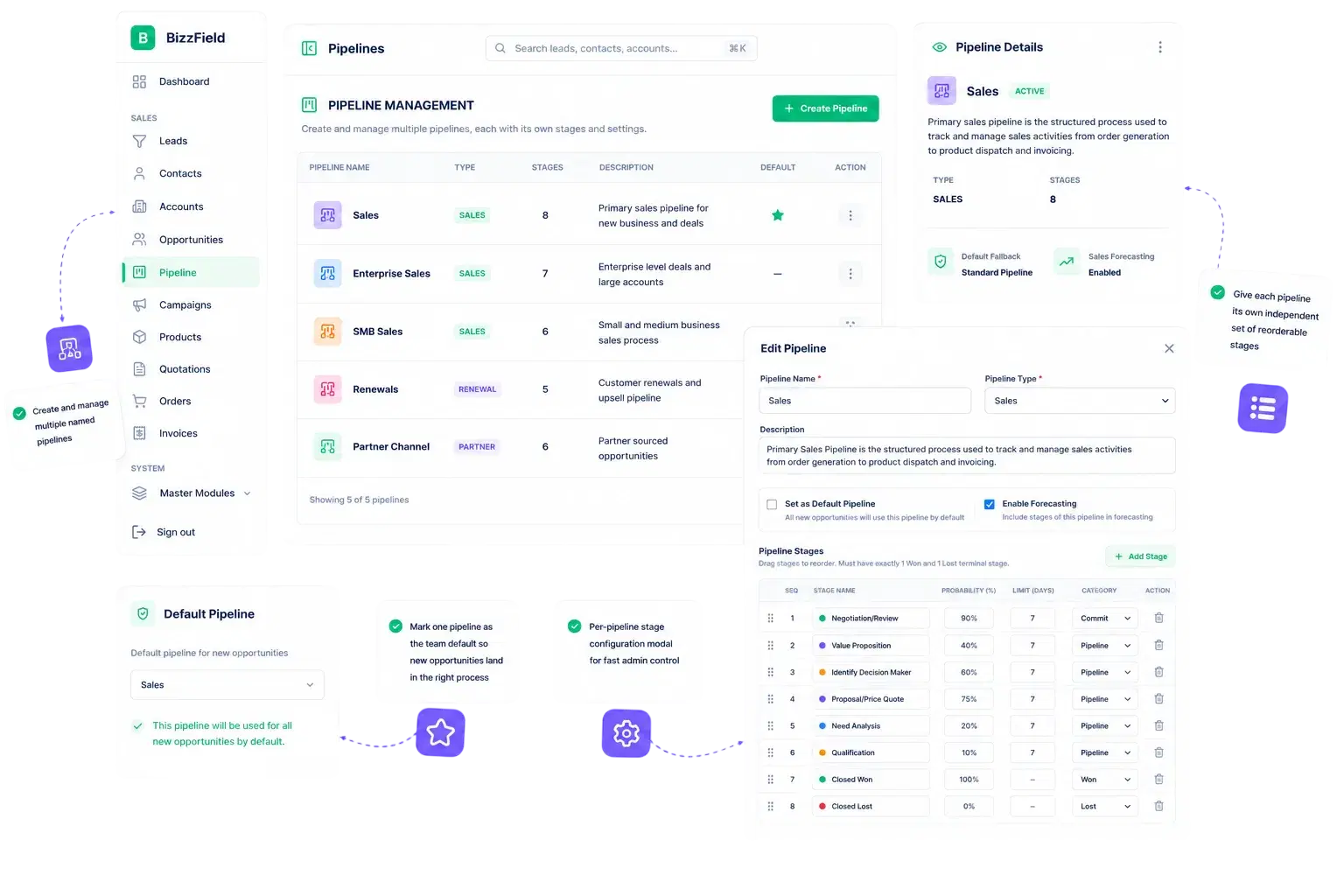
Multiple Pipelines, Built For Your Process

Model as many named pipelines as your business actually runs — one per product line, team, or sales motion — each with its own independent set of stages.

Create and manage multiple named pipelinesGive each pipeline its own independent set of reorderable stagesMark one pipeline as the team default so new opportunities land in the right processPer-pipeline stage configuration modal for fast admin control
02

Terminal-State Logic, Not Just Labels

Stages That Know When a Deal Is Done
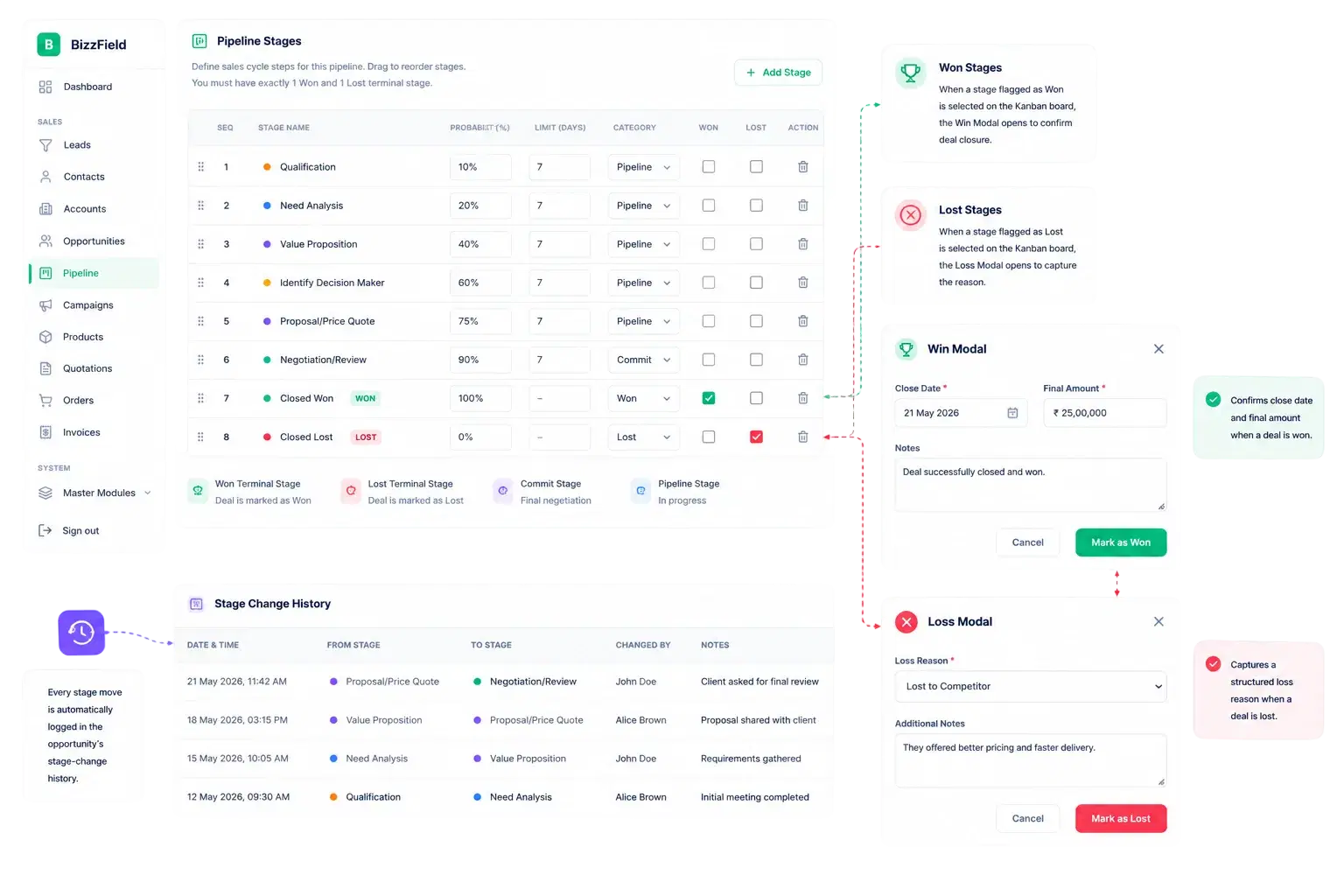
Stages That Know When a Deal Is Done

Any stage can be flagged Won or Lost. That flag drives the rest of the CRM — from the modal that opens on the Kanban board to the reports that measure win rate.

Fully custom, reorderable stages per pipeline, sequenced to match realityFlag any stage as a Won terminal stage or a Lost terminal stageWon stages connect to the Kanban Win Modal, confirming close date and final amountLost stages connect to the Kanban Loss Modal, capturing a structured Loss ReasonEvery stage move is logged in the opportunity's stage-change history
03

Configuration Drives the Board Directly

The Pipeline You See Is the One You Work
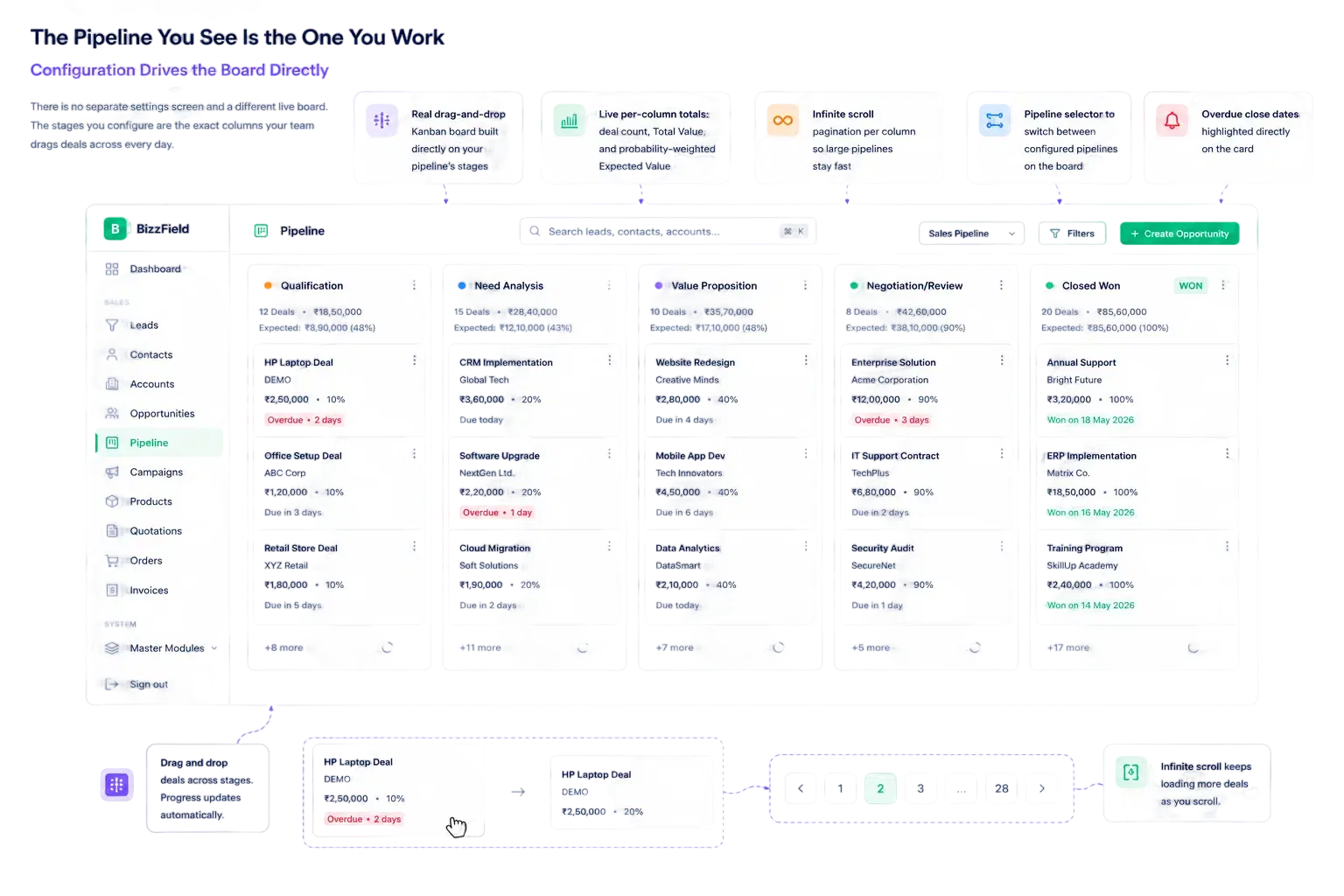
The Pipeline You See Is the One You Work

There is no separate settings screen and a different live board. The stages you configure are the exact columns your team drags deals across every day.

Real drag-and-drop Kanban board built directly on your pipeline's stagesLive per-column totals: deal count, Total Value, and probability-weighted Expected ValueInfinite scroll pagination per column so large pipelines stay fastPipeline selector to switch between configured pipelines on the boardOverdue close dates highlighted directly on the card
04

Create, Duplicate, and Retire Without Risk

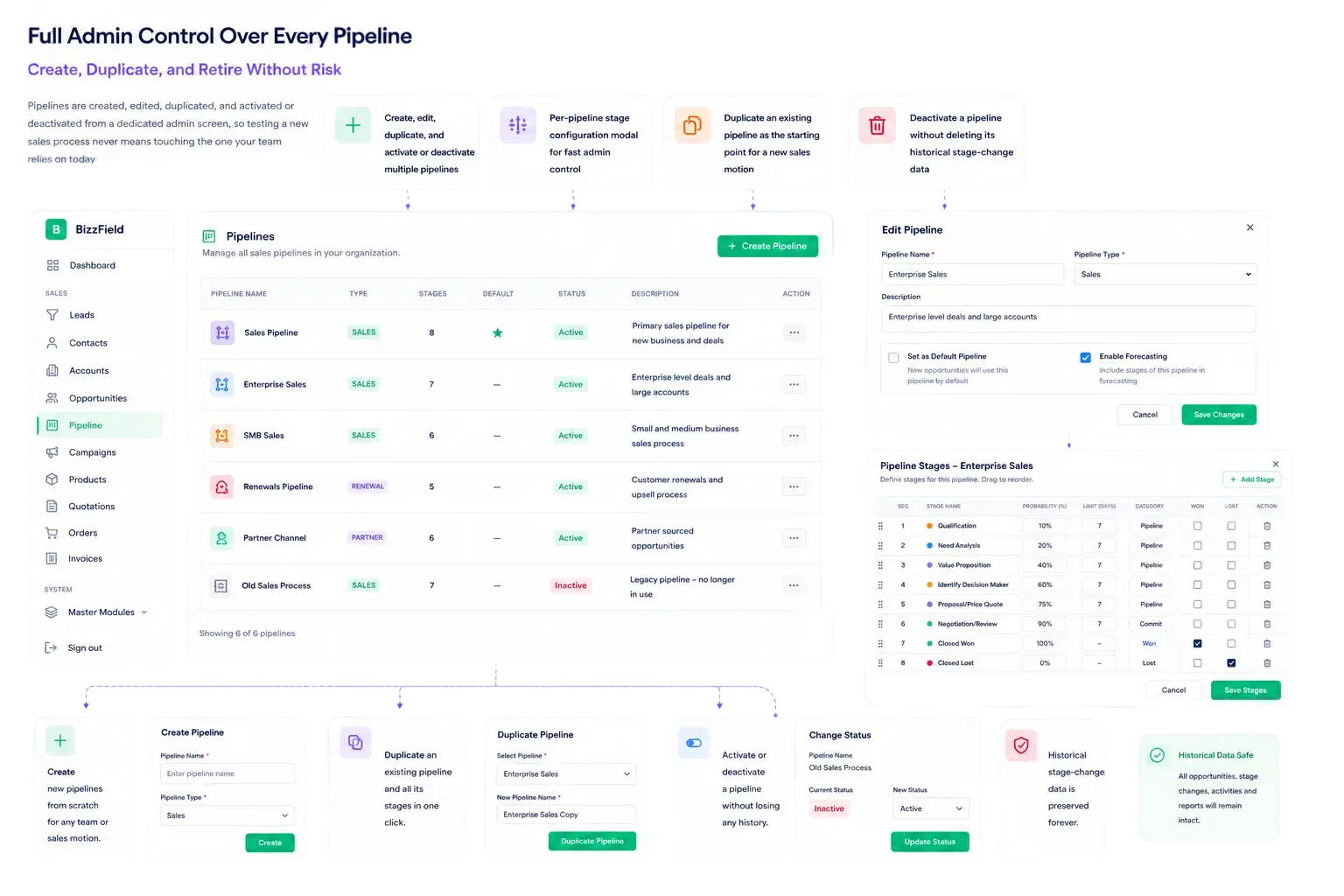
Full Admin Control Over Every Pipeline
Full Admin Control Over Every Pipeline

Pipelines are created, edited, duplicated, and activated or deactivated from a dedicated admin screen, so testing a new sales process never means touching the one your team relies on today.

Create, edit, duplicate, and activate or deactivate multiple pipelinesPer-pipeline stage configuration modal for fast admin controlDuplicate an existing pipeline as the starting point for a new sales motionDeactivate a pipeline without deleting its historical stage-change data
WHY BIZZFIELD

Why Sales Teams Choose BizzField's Pipeline Engine

Structure that matches how your business actually sells, not a rigid single funnel.

Multiple Pipelines, Not One Rigid FunnelModel as many named, independently-staged pipelines as your business actually runs, each with its own default.
Configuration Drives the BoardStages you reorder for a pipeline are the exact columns your team drags deals across on the Kanban board.
Won and Lost Are StructuralTerminal stage flags trigger the Win Modal or a structured Loss Reason, so closed-deal data stays clean.
Every Stage Carries Real NumbersLive Total Value and probability-weighted Expected Value roll up per column as deals move through your stages.
One Default, Unlimited FlexibilityDesignate a default pipeline for consistency while still customizing multiple pipelines for other teams or regions.
PROVEN RESULTS

Results. Not Promises.

What sales teams see once their pipeline is structured instead of self-reported.

0Mistyped Stage Valuesstructured dropdown, not free text
2Views of the Same PipelineKanban and table, always in sync
1Click to Reorder a Stageno rebuild, no retraining
100%Live Column Totalsvalue and expected value, always current
HOW IT WORKS

From Stage Design to Closed Deal

Configure once, then let every opportunity move through it on the board.

01Design Your PipelineCreate a named pipeline and lay out its stages in the sequence that matches how your team actually closes deals.Create multiple named pipelines for different sales motionsReorder stages per pipeline with no rebuildSet one pipeline as the team default
02Flag Won and Lost StagesMark the terminal stages so the CRM knows exactly when a deal is genuinely closed, not just moved.Any stage can be flagged Won or LostWon triggers the Win Modal for close date and final amountLost triggers the Loss Modal for a structured reason
03Work the BoardReps drag deals across the configured stages on a live Kanban board with real-time column totals.Drag-and-drop cards move deals between stagesLive count, Total Value, and Expected Value per columnPipeline selector switches boards instantly
04Audit and ReportEvery stage move is logged, feeding the reports that show where deals actually stall and close.Stage-change history logged per opportunitySales Pipeline report breaks down by stageWin/Loss Analysis draws on structured Loss Reasons
FAQ

Sales Pipeline — Questions Sales Leaders Ask

Yes. BizzField supports multiple pipelines — for example, one per product line or team — and you can set any one of them as the default that new opportunities land on.

Each stage can be flagged as a Won or Lost terminal stage. When an opportunity moves into one of those stages, the board treats it as closed and prompts for confirmation details.

Yes. Stages are reordered per pipeline with no rebuild and no retraining — the board simply reflects the new sequence the next time it loads.

A Win Modal opens to confirm the actual close date and final amount before the move completes, keeping revenue reporting accurate instead of relying on a stale stage guess.

A Loss Modal opens and requires a structured Loss Reason before the move completes, so patterns behind lost deals are analyzable in the Win/Loss Analysis report instead of scattered in emails.

Yes. Each Kanban column shows live count, Total Value, and probability-weighted Expected Value as deals move — no manual summing before a review.

See Your Sales Process Modeled Properly

Most sales leaders see their real pipeline — stages, terminal states and live totals — inside the first fifteen minutes of a demo. Configure it once, and every deal your team closes runs through it correctly.